Fedora 45 testing and deprecating the IWD Wi-Fi Backend in Aurora

Hello stargazers,
Fedora 45 Beta has been released and we have already been building Fedora 45 based builds in our testing branch. If you want to see the whole planned Fedora 45 changes, you can find them here. Current blocker bugs can be found from Fedora QA.
If you want to help us test these builds, you can easily rebase to the testing branch.
Then we have some news about IWD Wi-fi backend that some of you might be using.
Fedora 45 Beta testing
We recommend you pin your current deployment before rebasing:
sudo ostree admin pin 0
Then you can rebase to the testing branch with the rebase-helper tool:
ujust rebase-helper
Then select your current image (aurora/aurora-dx or the nvidia-open variant) and then select the testing branch:
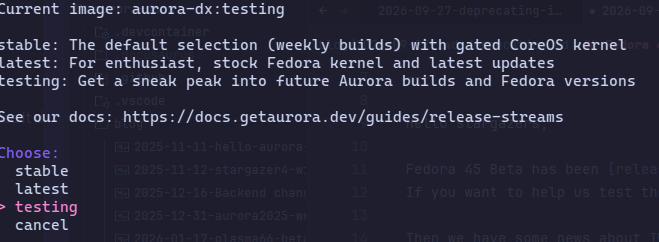
or you can do it manually with bootc switch:
sudo bootc switch --enforce-container-sigpolicy ghcr.io/ublue-os/aurora:testing
IWD Wi-Fi backend deprecation
Aurora has had support for Intels IWD backend as an optional feature. On some hardware IWD offered a better user experience than the default wpa_supplicant.
Intel has stopped the official development of IWD and there hasn't been any other developer that would have picked up the project. This means that there will be no updates for IWD going forward.
As said, this hasn't ever been officially the default mode, so the following is for users that have manually enabled iwd as their wireless backend.
Background
For some time, Aurora included an optional recipe (ujust toggle-iwd) that allowed users to opt into using IWD instead of wpa_supplicant as NetworkManager's wireless backend. On certain hardware, IWD offered advantages like faster scanning, lower roaming latency, and better handling of certain modern Intel Wi-Fi chipsets.
However, with Intel discontinuing upstream maintenance, there is a possibility it breaking with newer kernels or causing other issues in the future. And at some point Fedora will probably drop the rpm package for it.
How to switch back
If you have used our ujust script to switch to IWD, here are the steps that you need to take to get back to the default wpa_supplicant backend.
We will have a weekly notifier that will give you a notification on your desktop if you happen to be running the IWD backend. Once you have switched the backend, the nofitication will stop.
We recommend switching back on your own terms when you have a few minutes to reconnect to your Wi-Fi network:
- Open your terminal and run:
ujust toggle-iwd - Select Disable IWD.
- Reboot your system.
Because iwd and wpa_supplicant manage network secrets and connection profiles differently, switching back clears saved wireless network profiles to prevent authentication deadlocks.
After rebooting, you will need to select your Wi-Fi network and re-enter your password in the system tray or network settings. Wired Ethernet and VPN connections are unaffected.